Trusted by 35,000+ businesses

4.5/5 8905 G2 reviews







Automated Actions
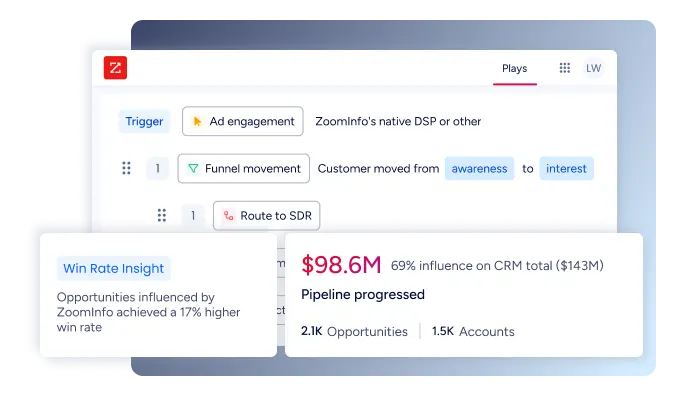
Trigger outreach when buyers show interest
Set up workflows that automatically add prospects to sequences when they visit your site, show intent, or match your ICP. Your team reaches out while interest is high, without manual sequencing.
Powerful Integrations
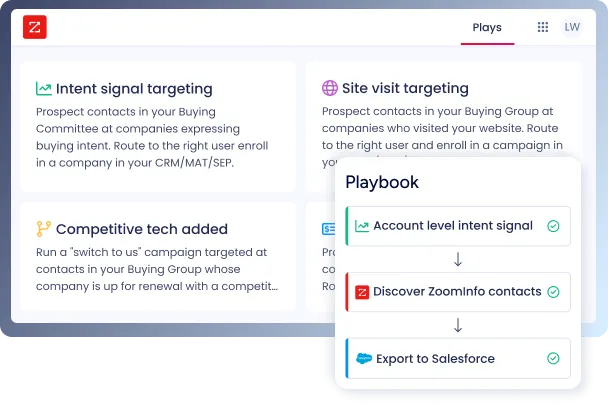
Make your favorite tools work smarter
See what your CRM and engagement and automation platforms can do with the cleanest, most comprehensive data powering your sales cycles and marketing campaigns.
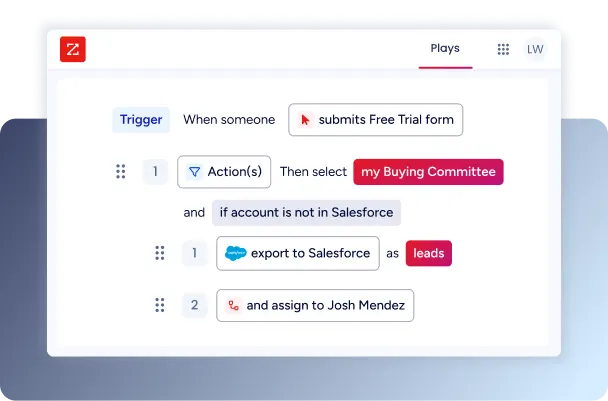
Trusted by sellers, proven in pipeline
With AI-powered Copilot, teams cut prep time, book more meetings, and accelerate pipeline - while driving higher win rates and measurable ROI.


90s SLA
Sales reachout within 90 seconds
The automation that Workflows provides on the backend helps us be really effective on the frontend. We are extremely proud of our consistent 90-second SLA with prospects whose buying signals break our algorithms' predetermined threshold.

Freed
Up time for strategy
The time savings with Workflows has been incredible. It has allowed me to step out of the day-to-day, tactical tasks and spend more time on strategy.

Automated
Intent-to-campaign pipeline
We've customized ZoomInfo Workflows to flag relevant companies that are spiking on our Custom Intent topics. From there, the best fit titles from those accounts are automatically identified and pushed into our email nurtures and digital campaigns.
FAQs
What are Workflows in ZoomInfo?
Workflows automate manual sales and marketing processes by monitoring key events and triggering actions (like exporting contacts/leads or alerting reps) based on your defined criteria. This boosts productivity, reduces errors, and ensures repeatable go-to-market execution.
Can non-admin users create or edit Workflows?
Yes. Non-admin users can create and edit Workflows if granted the required permissions. Both admins and non-admins have access to the same triggers and actions, as long as the permission is enabled.
What systems can Workflows integrate with?
At the highest level, buying signals are actions or insights that indicate a customer or prospect is “ready to buy” or provide valuable context about an account’s status. These signals, which come from various sources, simplify the notoriously complex B2B sales cycle by offering a clearer view of customer intent and timing.
Workflows integrate with popular CRMs like Salesforce, MAPs, Salesloft, Outreach, and others. They can push information into your CRM, launch sales engagement sequences, and automate outreach via various tools your team already uses.
Is Workflows available on all ZoomInfo platforms?
Workflows is a shared feature across ZoomInfo Marketing (ZIM) and Sales platforms. Users with access to both, and the right settings, can create/edit Workflows in either, and see the same triggers, filters, and actions.
Are there organization-wide (global) settings for Workflows?
No. Settings such as duplicate creation rules or export limits must be defined per Workflow. Admins cannot set org-level defaults for these; each Workflow is managed individually.
Can Workflows be managed across integrations (e.g., Salesforce leads vs. contacts)?
Admins configure which record types (leads, contacts) are available via integration settings in the Admin Portal. The choices in Workflows reflect whatever is enabled for that CRM.
Are there API usage safeguards?
Yes. For integrations where supported, Workflows will stop exporting at 90% of your daily API limit to safeguard platform resources. Some integrations (like Pardot/Slack) do not support this monitoring.
Where can I learn how to set up and manage Workflows?
ZoomInfo provides a Workflows Implementation Guide, video tutorials, and detailed courses through ZoomInfo University.